Pages

Contact Us

Search This Blog

Monday, December 12, 2011

Printing Reports From Paypal

So far, we've discussed what you should be writing down every day. Now, I'm going to show you what to do with all that information at the end of the month.  This is where the right side of page 2 in our Dome book comes in.


We're going to total up everything from the Expenditures page and write it in the write spot on this page. But first, let's print some reports from Paypal to make it easier.

Here is what you'll need to print, and where to find them (bookmark Paypal's Transaction Finder - it's about to become your best friend):


Payments Received. In the Transaction Finder, leave the Search Keyword(s) field blank. Choose your date range (the first of the month through the last of the month). Choose "Payments Received" from the drop-down menu. Click on Search. This will take a few minutes to generate.
Once the report has been generated, you'll want to download it to your computer. On the right, next to the Printer icon, chose Excel from the dropdown menu, and then choose Download. (Obviously if you don't have Excel, you'll have to do a PDF. I prefer Excel, because I often have to modify these reports. More on that in a bit...) It will ask you if you want to Open or Save the document. I don't bother saving, because I usually make my modifications and print immediately. If you don't have time to do that, then go ahead and save.

Once you've got your Excel document open, you'll want to delete the blank columns and shrink the other columns so that it's only one page wide. Now, there's two more very important things to double check before you print. You'll want to go through this document and delete any personal transactions (Aunt Jane sent you $50 for your birthday - you don't have to pay taxes on that). You'll also want to double check for duplicate transactions. See this example?


Leonardo bought 5 items from me on November 1. The total of ALL 5 transactions was $20.81. But because it was 5 separate items paid in one transaction, for some ridiculous reason Paypal shows that as 5 transactions of $20.81. I need to delete 4 of those, because they are DUPLICATES. This is very important. Unless you want to pay 5 times the income tax that you need to. So go through your Payments Received document and delete personal transactions and duplicate transactions. Once you've done that, go ahead and print that spreadsheet. 

eBay Fees. This one's an easy one. I pay my eBay fees weekly, and every week, I save my Paypal receipt that comes to my email. I just print out those emails. But if you only pay once a month, you should be able to find this number in your eBay account (probably by printing the month's invoice?)

Paypal Fees. You can get this from the Transaction Finder. Leave the search field blank, choose the date range, and choose "Fees" from the drop-down menu. Go ahead and Search, then download as an Excel document just like you did for Payments Received. At first glance, this report is going to look exactly the same, but this report shows any fee reversals (from refunds). You'll need to double check this report for duplicates and personal transactions. Also make sure you delete any empty columns and shrink the other columns down to fit on one page across, then go ahead and print.

Shipping Paid. In your Transaction Finder, there are 2 different reports you'll need, depending on how you print your shipping labels. If you ONLY print through eBay, then enter "eBay" in the search field, choose your date range, and choose "All" in the drop down menu. If you ONLY print through Paypal, then leave the search field blank, choose your date range, and choose "Shipping" from the dropdown menu. If you do a mixture of both, as I do for various reasons, you'll need to do both of those reports. Once these reports have been generated, download the Excel version, just like you've done for the other reports so far. These shouldn't need double checked for duplicates, but they may need double checked for personal transactions - if you shipped something to a friend, or if you shipped books for Paperback Swap, for example.

Insurance Paid. This one will depend on who you insure your packages through. I use the Shipsaver application through eBay, so all of my insurance payments go to InkFrog. To find that report, I type "inkfrog" into the search bar, choose my date range, and choose "All" in the drop down menu. Same as above - download as Excel, make sure it fits on one page across, and print.

Refunds Given. Another easy one. In the Transaction Finder, leave the search field blank, choose your date range, and choose "Refunds Sent" from the dropdown menu. You know the drill. Create the report, download as an Excel, print.

Inventory Purchases. You won't find this in Paypal. This is just on the list to remind you to gather up all of your receipts from the month, which you SHOULD have already entered into your Dome book. You just want to have them so you can double check your entries and then add them to your monthly bundle of papers.

Supplies. When you order supplies (boxes or bubble wrap on eBay for example), save the order confirmation email that you get. I have a "Print for December" folder in my email (which I obviously change with each new month). All my eBay related expense emails go in that folder until the end of the month. If I print them as I go through the month, I'll lose them. So as you're printing your other reports, you'll want to go into that folder and print any of those emails. If you don't have them, hopefully you've written them in your Expenditures section in Dome, so you'll be able to easily find them in your Paypal history. Just print that page instead.

Road Trips. Gather up your food/toll receipts. I have an EZ-Pass, so I go into my EZ-Pass account and print a statement from the month, highlighting the relevant toll charges.

Commissions. If you sell for anyone else, you'll need a record of how you've paid them. I send my sister-in-law her payments through Paypal, so I just print the Paypal receipts from each time I pay her. Other people that I just sell for here and there, I have a receipt book. I save the carbon copy for myself and give them the original. Gather all of these receipts now.

Miscellaneous. If you had any expenses that I didn't already mention, print those receipts. This might be a 3rd party listing service subscription, or a book you bought about selling on eBay, or a book about a specific topic (glasswares, Pez dispensers, whatever other research topics...).

Ok, I have given you a TON of homework in this post. I know I promised that my way of doing paperwork will be quick and painless. Honestly, this step is the hard part. It takes me about an hour to get all my reports printed for the month. But it's better to spend an hour a month printing reports than to be scrambling around in March trying to find a YEAR's worth of reports. So now you've done the hard part. You've gathered all your reports and receipts. Staple each type of report together (all your Payments Received pages, all your Shipping Paid pages) into its own package and tuck them in the back of your Dome book. Tomorrow I'll teach you how to use these reports to reconcile your books for the month.

*****************
Other posts in this series:

Sunday, December 11, 2011

A Sample Dome Day


Yesterday, I mentioned my beloved Dome book. It looks overwhelming at first, but today I'm going to walk you through a day's work in it, step by step. It's so much easier than it looks, I promise!

We'll start with the easiest page - the Detail of Monthly Expenditures Sheet. Here is mine:

The left side of the page is to record your inventory purchases. I try to do this as soon as I get home from thrifting, but more often than not, I'm digging out 4 or 5 receipts from the bottom of my purse and entering a bunch at once. For the new year, I'm going to try really hard to get into the habit of doing this immediately. Waiting is how receipts get lost. Lost receipts are lost deductions.

So in the far left column, you'll write the date. You have a new one of these pages for every month, so you don't even need to write the month. If you shopped on the third, just write a 3 in this column. The next column is to record who you paid. That would just be "Goodwill" or "Yard Sales" or if you bought something from a specific person, write their name here. The next column is for check number. I don't usually pay for things with checks. I just write "PP" for Paypal, a checkmark for checking account, or a $ for cash. This has helped me a few times, but not often. If I don't have a receipt, I can tell at a glance how I paid. If it was a check, I can print the check from my online bank account. If it was Paypal, I can print my transaction details page from them. If it was cash, well, I'm out of luck. The last column is for the amount. That should be pretty self explanatory.

Now let's look at the right side of this page. This is for other expenditures that are NOT inventory. This would be for shipping or insurance that you purchased, boxes, labels, tolls and meals from road trips (not gas, unless you are planning on taking exact expenses for travel, which I don't recommend), eBay fees, sales tax paid to your state, etc... It's the same layout as the left side of the page. Date, who you paid, check number, and amount. But there is one extra column for account number. You'll be getting this number from the page that we're about to discuss. After a week or so of entering data, you won't even need to look up these account numbers anymore. You'll have them memorized.

Now let's look at the other page you'll be using daily.


This one looks more complex, but it's really not. Just take it one line at a time. The left column will be for your daily income received. You're going to take these numbers straight from your Paypal account. These numbers will not match your eBay sales for the day. You're only going to write the money down on the date that the item was actually paid for. The numbers that I have along the far left (outside of the chart) are how many payments I received. I don't know why I write that down. It's useless information, and I probably won't bother keeping track of that next year.

I have added an extra column to my book. My state requires that I separate shipping out from the purchase for sales tax purposes. We don't have to pay sales tax on shipping in Pennsylvania, so I need to keep that amount separate. So my book has four columns in this section: Taxable PA Sales (my own column), All Sales, Shipping, and Total Amount. Down the left, you'll see there's a line for each day of the month.

So each morning, while you're waiting for your coffee to cool, log in to your Paypal account and do a basic search (top center of the screen) for the previous day's date. Once those transactions come up, add up any shipping you paid the previous day and write that on the first page we talked about (in the right column). Find any other expenses you had the previous day and write them in the right column too. Next, you'll need your income numbers, which are on the same screen. If you don't need to separate out your shipping for sales tax purposes, then just add up all your payments received and write them on the second page we discussed. If you have to separate shipping out, then you'll need to actually go into each transaction. I write click on "Details" for each transaction and open it in a new tab. That way there's no annoying back and forth. Open each transaction in a new tab. Then go through and add up the item prices and write them down in the All Sales column. You'll also need to add up the shipping charges and write them down in the Shipping column. If any of them were taxable, then write just the taxable sales amounts in the Taxable PA Sales column (using your own state, obviously).

Let's look at an example from my book.


On December 7th, you can see that I received 5 payments. I had one taxable PA sale. It was $9.75 plus shipping, so I separated out the $9.75 into the Taxable PA Sales column. The next column will be ALL my sales (including that PA sale). All 5 transactions (purchase price only) totalled $78.25. The total shipping for all 5 transactions was $28.24. I received 59 cents sales tax, so I jotted that down real small so I would remember to add that amount in. Then I added up the Total Sales, Total Shipping, and tax received and got a total of $107.08.

If I have any out of the ordinary transactions, I jot them down in the Memo block at the bottom left of this page. This is where I write any refunds that I have to issue, or any shipping refunds I received for labels that I had to void.

I know this sounds like a lot, but once you get the hang of it (after about a week or two of regular entering), you'll be able to do a whole day's entries in 5 minutes or so.

So to recap, each morning, you should be writing down this information from the previous day:
  • all shipping/insurance paid
  • any other expenses paid
  • all payments received (separating out the shipping if your state requires it)
  • any oddball stuff (shipping refunded to you, refunds you issued, etc...)
For now, you aren't going to do anything at all with the right side of this page (the expenditures). You won't have to do anything with that section until the end of the month. We'll be discussing that in a couple days. I've given you enough for one day :)

*****************
Other posts in this series:

Saturday, December 10, 2011

Getting Ready for Tax Time, Part 1


Don't be afraid. It's not scary and overwhelming if you do it a little bit at a time. Of course, if you haven't kept up with your paperwork for 2011, it's a little late to do it a little bit at a time for this year, but hopefully this series will help you be better prepared for 2012!

I so often read posts where people say, "Oh, I only made such-and-such on eBay" or "I just sell part-time" or "I'm just a hobby seller" so they think they don't have to report their income to the IRS. Well, guess what. Income is income. You DO have to report it, whether you made $1,000 or $100,000. The only difference is, Paypal won't be reporting your income to the IRS if you had less than $20,000 (all incoming funds, not just the actual sales amount - this includes shipping!) AND 200 transactions. You still have to report it.

So you want to get that number as low as you possibly can, by saving receipts and taking every deduction you can think of. But we'll get to that in a later post. Today's post is about keeping a daily record. If you do this every day, or even every 2 or 3 days, it only takes a couple minutes, and at the end of the year, you will be totally prepared for tax time!

To start with, I highly recommend a pencil and paper approach. I know that sounds archaic, but who do you trust with your money numbers? A computer program (with proven glitches), or your own records? I personally prefer my own records. So I use a Dome Record-Keeping Book. I used a monthly book for 2011, and that's what I've linked to, but I'll be using a weekly book for 2012. I really have a LOT of transactions over a month, and reconciling my books every month was taking a long time. I'm going to try the weekly book this year, because I'm hoping reconciling my books weekly instead of monthly will be quicker.

The Dome book is great! It's got everything you need right there. There are sections for all your deductions (shipping supplies, inventory purchases, shipping costs, fees, etc...) and there is a section for all your payments received. It's broken down monthly, so at the end of each month, I print my reports and double check the numbers. After any given month in the year, I know exactly what my net income has been for the year. It's a nice way to keep tabs on your business and not be totally shocked and unprepared at the end of the year.

I try to do this daily, but more often than not, I end up doing it every couple of days. (I do have a life outside of eBay, you know...) Each morning, I go into my Paypal account and write every transaction in my book. Some of them I combine, like all the shipping I paid. I write that total down under expenses. I add up all my payments received (I separate out the shipping for state sales tax purposes) and I wrote those numbers under income. I also enter any receipts into my expense section as soon as possible after I get home. I have a 13-section divided portfolio that I drop those into immediately, so they don't get lost. A lost receipt is a lost deduction :(

I keep a small calendar in my purse, so every time I go to Goodwill (or yard saling, or wherever), I can quickly jot down my mileage on the correct day in my calendar. Mileage can add up to a HUGE deduction at the end of the year! My miles will be a really big lifesaver this year.

This post feels like it's all over the place, but it's just an introductory post. A brief overview. I'll elaborate more over the next few days. But for starters, get yourself a Dome book, study the pages, familiarize yourself with the setup. Over the next few days, I'll teach you more specifically how to use it.

Upcoming Posts in This Series:
  • A Sample Day in My Dome Book
  • Printing Reports from Paypal
  • Monthly Reconciliation
  • Allowable Deductions
  • Putting It All Together on Your Schedule C

Friday, December 9, 2011

Packing With Care

Ok, so you've gotten your boxes and your packing materials. Now it's time to get that sold item safely delivered to your buyer. Nothing says "I care" quite like tossing an item in a box and taping it shut. So I like to step it up a bit and go the extra mile to show my buyer that I DO care if they are pleased with their item. There are as many different methods for packaging as there are sellers, but here are a few tips on how I package different items:
  • Clothing: I wrap clothing neatly in tissue paper and slide it into a polymailer. I squeeze all the air out and seal it shut. Super easy.
  • Books: Most paperback books I just drop into a polymailer. (So much for that extra mile, huh?) If it's got sharp corners or if it's a hard back, I either put it in a bubble mailer or I wrap it in bubble wrap and slide it into a polymailer. I don't sell a lot of books. Clearly.
  • Plush: If it's just a regular one (no hard parts or sound boxes), I put it in a polymailer. I would prefer to wrap them in tissue for nicer presentation, but plush isn't exactly easy to wrap in tissue, and I'm afraid my efforts would make it look sloppier than if I just leave it unwrapped. If it's got hard parts or a sound box, I put it in a polymailer and then in a shipping box.
  • Shoes: I slide my business card into one shoe (more on that later) and place that shoe 1/3 of the way over a large sheet of tissue paper. I fold the shorter end over that shoe, then place the other shoe next to the first shoe and fold the other end over all of it. I tape the tissue up and slide the shoes into a priority shoe box. Then I put some balled up newspaper in the end.
  • Breakables: If it's a hollow item (casserole, saucepan, bowl, mug), I fill it with packing peanuts. Then I wrap it in bubble wrap (usually at least twice around). If it's got a lid, I wrap it separately, then I tape the wrapped lid very tightly to the wrapped dish and wrap the whole thing once more. If it's multiples (more than one plate or mug), I wrap each individually, then tape them tightly together and wrap again. If it's nesting bowls, I wrap each individually (filling only the smallest with peanuts), nest them together, tape them very tightly together and wrap once more. I use a box that will give me 2" of space on all sides. I put packing peanuts in the box, then the item, then fill the rest of the way with packing peanuts. You want it packed tightly with peanuts so that there is NO movement in the box once it's taped shut.
  • Board games/Latch hook kits: These usually just slide into a flat priority box (medium flat rate or regional rate side-loading) with some newspaper or air pillows to fill the extra space.
I think that's the bulk of what I sell. I don't get into large breakables (lamps and similar items), so if you sell those things, please let us know in the comments how to pack them safely.

One last thing I like to do, just to add a nice professional touch. I have a business card with my contact information. I always include one of them in each package.


(I just blacked out my email so I don't get junk mail.) When I am notified that I've received a payment, I grab a card and fill in the date ordered, paid, and shipped. On the back, I jot down what they bought and write a "Thanks!" across the back. I also make a note of anything I need to remember for shipping. 99% of my items go priority mail, so I don't usually write anything. But if it's an extra large package that the buyer chose parcel post for, and it's too big of a difference for me to upgrade to priority (this happens alot with microwave turntables), I just write "parcel" in the corner. If it's an international shipment, I write "FCI" in the corner so I don't pack it in a priority box and have to repackage it.

I think this card is a nice touch. The hand-written "thanks!" shows them that I took an extra moment to thank them instead of just dumping their item into the bottom of a box. The dates section on the front shows them that if they paid 4 days after they ordered, and I shipped the same day, the delay was their fault, not mine. It shows them that I ship promptly, regardless of when they ordered and paid. It also gives them an easy way to contact me if there is a problem, and it helps them easily find me if they want to buy from me again.

What special touches do you like to add to your packages?

********
By the way, I know I've been promising a series on taxes, and I really will do that. The end of the year is coming, so it's definitely time. I'll get to it soon. Pinky promise!

Thursday, December 8, 2011

Economical Packing Materials


A week or so ago, I talked about free USPS Priority shipping supplies. But what if you're shipping internationally? Or what if it's a really heavy item and your buyer chose parcel post? You'll need to come up with boxes for those items. This picture isn't my house, but it's what my eBay room looks like sometimes, when I let the boxes take over.

There are quite a few resources available to us for plain boxes. I've not tried all of them, because my closet is already overly full, but hopefully this will give you some ideas.
  • Friends and Family. Social networking isn't all just Farmville and Likes. It can be a very useful business tool. Just post a status update asking your friends and family to save boxes for you. This time of year is especially good for that, because people are ordering Christmas gifts online and are probably wondering what they're going to do with all those boxes, packing peanuts, and air pillows.
  • Craigslist/Freecycle. This is the same as my above point, but you're asking strangers instead of friends and family. Strangers buy Christmas gifts online too :)
  • Local Stores. You could always stop in to local stores and ask them what they do with their boxes. I've heard that Dollar General is an especially good place to ask for their boxes. Cell phone stores are good for air pillows. Ask around. It won't hurt to try.
  • Buy them. Sometimes you just have to bite the bullet and pay for boxes. Most of my boxes are free to me, but I never come across free boxes that will fit a microwave turntable, and believe it or not, I have a hard time finding free plain boxes that will fit a pair of shoes nicely without being way too big. I buy my turntable boxes and shoe boxes on eBay. The prices seem very high, so you'd want to be sure you're buying them for high profit margin items. When you're paying $1-2 per box, you don't want to use that box on an item you're only making $10 profit on. I generally make $20 profit on my turntables, so I can justify paying $1 for a box. It certainly beats spending 45 minutes building one!
Now for economical filler materials.
  • Newspaper is the most obvious, but it can actually add a lot of weight to a package. It also flattens easily, so it's definitely NOT good for breakables. I do use it for filler in shoe boxes though.
  • Shredded newspaper is another option. Of course you'd have to buy a shredder (long-cut, not cross-cut). Shredded newspaper is fluffier than regular, so you can use less of it to fill more space, which cuts down on the weight.
  • Egg cartons can be used to fill up a little extra space with virtually no extra weight. Again, they're crushable, so they will only work on not-heavy items.
  • Folded cardboard can fill extra space too. I've never done it, but I've received packages that had folded cardboard in them. It worked pretty well.
I'm sure this isn't an exhaustive list, but it's enough to get you started. What am I missing? What do you use for packing?

My Top eBay Moments This Week

I need a "Top eBay Moments" logo. Anyone out there do that sort of thing??

Last Christmas, I hadn't really built up my store as much as I needed to in order to really experience a good Christmas selling season. This year, I was really looking forward to this big booming Christmas season, but I haven't seen it yet. I hear that I'm not the only one. It's pretty disappointing, but my sales have been steady for the most part, so I won't complain.

I had another good week, customer-wise. My last 1-month negative fell into the 6-months category, so I feel really good about that. My DSR's are climbing back up and should start falling off my 3-month evaluations in the next week or so. I survived the worst feedback month I've ever experienced. Yay!

I sold 47 items this week. That is definitely less than I have been selling lately. My dollar amounts are lower as well. I only sold 5 pairs of shoes. I have about 50 pairs that I really need to get listed in the next week or so! People are buying more of my NWT items and I've really sold a LOT of clothing this week, both new and pre-owned.

My favorite sales:

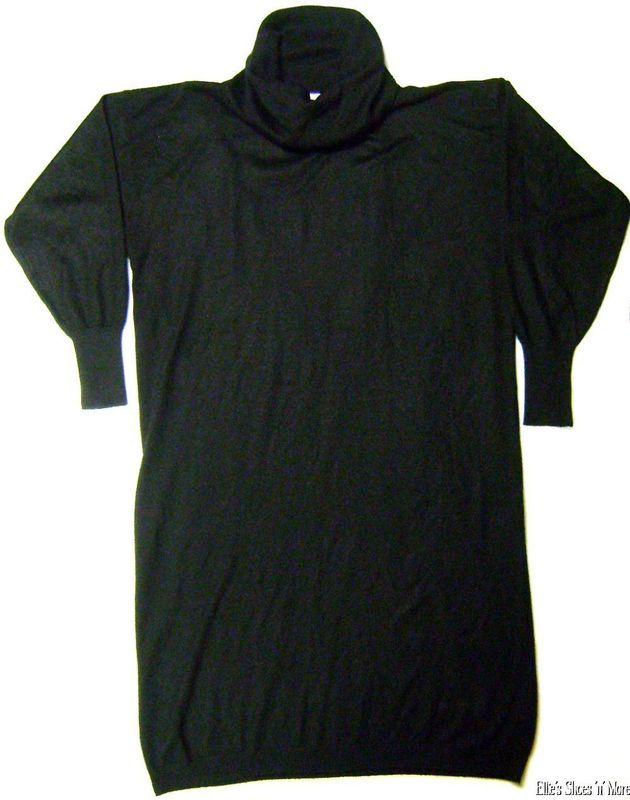
My sister's boyfriend's mother passed away a couple months ago, and I am listing a lot of her wardrobe. I just listed this last night. It's a cowl neck sweater dress from JP Knits. Nothing special about it, but it's plus size. I was pleasantly surprised to wake up to an offer already this morning. Sold for $20, free shipping ($4.70).


Tap shoes always sell well for me. I've sold girls', women's, men's. I've sold flat mary janes, heels, lace up jazz tap shoes. These are Bloch brand girls' tap shoes. I paid $2.99 for them in October and sold them this week for $25, free shipping ($5.00).


This was also given to me last week. My sister-in-law brought me a really big pile of coats and jackets from one of her neighbors. She said, "Keep what you want, sell the rest." I really like this one and would have kept it for my 8 year old, but we've got SO many coats and jackets, it's not even funny. There was another orange plaid hooded jacket in the pile, so I gave my son the choice of which one he wanted. Lucky for me, he wanted to keep the non-brand name one and I got to sell the Lands' End one. This sold 2 days after I listed it, for my full asking price of $29.99, free shipping ($5.45).


Last January, I bought a 6-piece set of Rudolph the Red Nosed Reindeer plush at a local thrift store. They are all CVS brand. I didn't expect them to do really well because of that, but they were half off, so I went for it. I got this Santa, a Rudolph, a huge Bumble, Sam the Snowman, Yukon Cornelius, and Hermie the Elf. I paid $7.95 for them and listed them individually. Because it was just after Christmas, they sold very slowly, but they did finally all sell. The Santa was the last one I had, and it sold this week for $29.99 + shipping. Total sales from that $7.95 investment? $147.96!!


This wasn't mine. I sold it for my sister-in-law. She sold on eBay for a brief spell, but because she was brand new, she had a hard time getting any sales at all, so she finally asked me to sell her Care Bears for her. This one sold within just a few days for my full asking price of $29.99 + shipping! Some Pillow Pals do better than others. I've had Love-a-Lot, Funshine Bear, Cheer Bear, and now this Friend Bear. Friend Bear sold quickly. The others didn't. But when they did finally sell, it was for a good profit, so I'll continue buying them.


I paid $1.50 for these suede Dansko sandals at the Goodwill bins in October. They weren't even in awful shape, as a lot of GW bin shoes are. They just needed a suede brush, and the insoles needed cleaned up. They sold this week for $45, free shipping ($4.70).


I'm really surprised these Uggs didn't sell faster than they did. I paid $5 for them in May. But they were a size 5 or 6, which isn't a fast-selling size for me. I did finally sell them for my full asking price of $45 + shipping this week.


I just woke up to this sale this morning! I paid $5 for them at a yard sale in July. You know your kid has too many toys if he doesn't even open up his Lego sets! An Australian buyer bought this set this morning for my full asking price of $49.99 + shipping. Shipping to Australia is always so expensive. They paid an extra $23 to ship these. And they chose First Class Mail, so I hope they aren't expecting it in time for Christmas.


I'm sure you all are well aware of my love of Doc Martens. They always sell very well for me, and these were no exception. I paid $5.99 for these in October. I couldn't find this pair listed anywhere (they zip up), so I listed them high at $99.99 or best offer. I knew full well I wouldn't get that much, but I was hoping to get at least $50 out of them. Someone offered me $35 the other day, and I almost declined, but I thought I'd counteroffer instead. I countered with $60. She came back with $45. I countered with $50. She came back with $43. Wrong direction! Our buyers only get 3 chances to make an offer, and she had used hers up. I knew if she wanted them badly enough, she would have to pay whatever I sent her back as a counteroffer, or she'd have to pay full price. I could have been ignorant and gone back up to $60, but I countered with $50 and she bought them. I'm sure I could have gotten more if I'd waited, but again - size 6. Slow seller. I'm happy with the $50.

And my top sale of the week! I had entered this beauty in our Ugly Christmas Sweater contest on the discussion board, but I didn't get any bids on it. I had started it at $29.99 and only had a couple watchers (from our group, I think). I was VERY pleasantly surprised when it sold this week at my full asking price of $69.99, free shipping ($6.65) !!


What were your favorite sales this week?

Wednesday, December 7, 2011

Dealing With Family and Friends' Reactions to What We Do

"You do WHAT for a living?!??!"

Anonymous brought up an interesting subject on yesterday's post. S/he is hesitant to share that they sell online, because they have gotten mixed reactions in the past. I will admit, several years ago, I knew of two people who sold on eBay. When I found out, I scoffed. It seemed like such a ridiculous waste of time, and just plain wrong to go around buying people's stuff for cheap and reselling it for high, as if it was actually worth something. (Ok, ok, I was a jerk about it...)

When I started selling on eBay, I only sold what I had around the house. I declared that I would never become "one of those people who buys stuff and turns around and resells it."  (Yeah, yeah, I was a jerk then too....)

It only took me a month or two to realize that there was good money to be made doing this, and that it would be really nice if I could contribute a few extra dollars to our household income. That quickly snowballed into a full-blown business that I am very proud of!

Along the way, I have had mixed feelings about sharing what I do. I once had someone ask me, "Where do you work?" (As if stay-at-home moms don't work hard enough as it is!) I said, "Oh, I don't work." And then I said, "Wait. Yes I do. I sell on eBay." She kind of chuckled a little bit, and I immediately felt defensive and blurted out how much I had in sales that month. Yes, that was tacky, but I didn't like the idea of her scoffing at me and my silly little hobby. I felt a need to validate it. I don't go around blabbing how much I make (except here occasionally, and in our sales goal threads on the discussion board), but I still struggle with feeling a need to validate what I do. I think most people don't realize how many people sell on eBay for an actual living, and not just for a hobby. I had no idea myself until I met the people in our fabulous group!

Even aside from people thinking it's just a hobby, I also get other unpleasant reactions from people. I have had people express their displeasure that I am buying up items from Goodwill that are intended for less fortunate people and using those items for my own financial gain. Well yes, I am buying items from Goodwill and reselling them for my own financial gain. That's called running a business. And no, I don't think the items at Goodwill are specifically intended for less fortunate people. Goodness knows there's enough there for everyone.

Another reaction I get is people belittling the work I put into this. I've had people actually get annoyed with me when I celebrate an exciting sale, because they think I don't work hard, or that I don't deserve it. They think it's not fair that they work harder than I do and make less money. I am extremely fortunate to have been able to find an exciting job that I love that allows me to stay at home with my kids. I understand it's not for everyone. I also understand their frustration that they've paid oodles of money for college degrees to get jobs that pay less than what I make, and I didn't have to shell out those big bucks. But ya know ... We all choose our own paths in life.

So I guess now that I've babbled on long enough, I'll address the actual question. Basically, I don't go out of my way to tell people what I do, but I don't hide it if they ask. I try really hard not to feel defensive when I see them snicker or roll their eyes or blow it off as a silly thing, but that's not easy. Once they see that my eBay business has paid for our entire Christmas, or for our entire week-long family vacation, then maybe they'll realize that it's a valid career choice. But I won't be dwelling on it then. I'll be lounging poolside :)